Run coding agents in their own Linux VM. See everything they did.

Agentarium gives each agent a persistent microVM on your Mac, with only the folders and network access you grant. An eBPF observer records the programs it runs, the files it changes and the connections it makes.

Apple silicon, macOS 26 or later. Free and open source under AGPL-3.0. All releases

Ready for
  • Claude Code
  • Codex
  • Antigravity CLI
  • GitHub Copilot CLI
  • OpenCode
  • OpenClaw
  • Hermes Agent
  • Agent Canvas
  • Custom agent
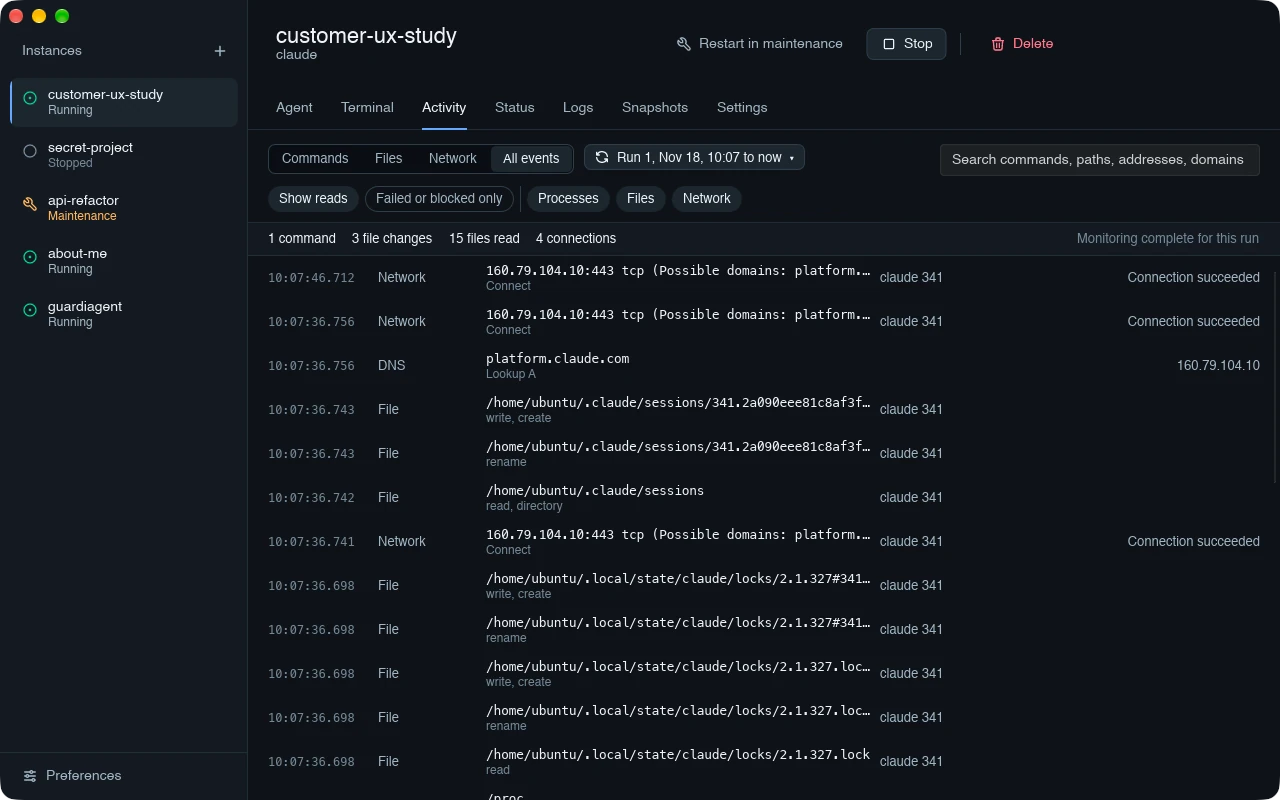
The Agentarium window: a sidebar of instances, and the Activity tab of the running instance customer-ux-study, listing network connections, a DNS lookup and file writes made by Claude Code, with monitoring complete for this run.

Monitoring complete
Each run says whether monitoring was complete. Lost events are reported, not hidden.

Allowed
Every connection, with the domains it may belong to and what the Mac decided.

Recorded
File writes, renames and reads, with the process that made them.

ActivityA Claude Code session, recorded from outside the agent. Click the picture for full size.

One VM per agent, rules it can't change, a record of what it did

An instance is a Linux virtual machine on your Mac with its own disk. The agent runs inside it and sees only the folders and domains you allow.

New instance: shared folders
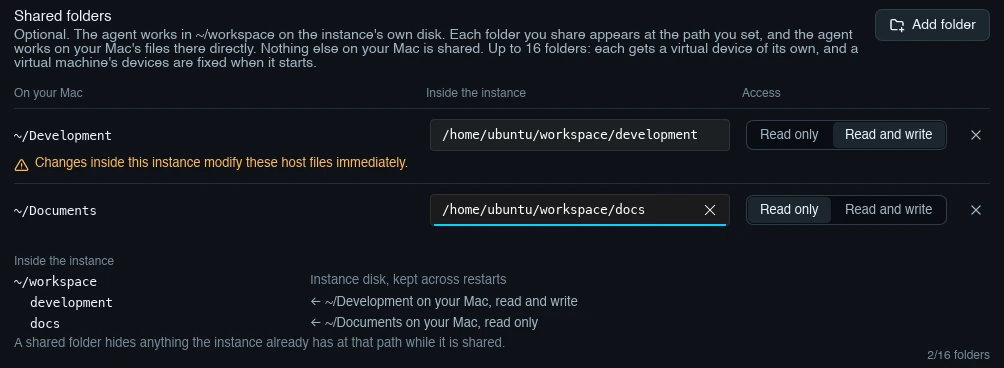
Shared folders in the New instance flow: ~/Development shared read and write, with the warning that changes modify these host files immediately, and ~/Documents shared read only.

Isolate

Each agent instance runs in its own persistent Linux microVM, built on Apple's Virtualization.framework, with its own disk. Your Mac's files stay out of reach unless you share a folder.

Share up to 16 folders, read only or read and write. The Mac enforces it, so root inside the VM can't lift it.
New instance: network
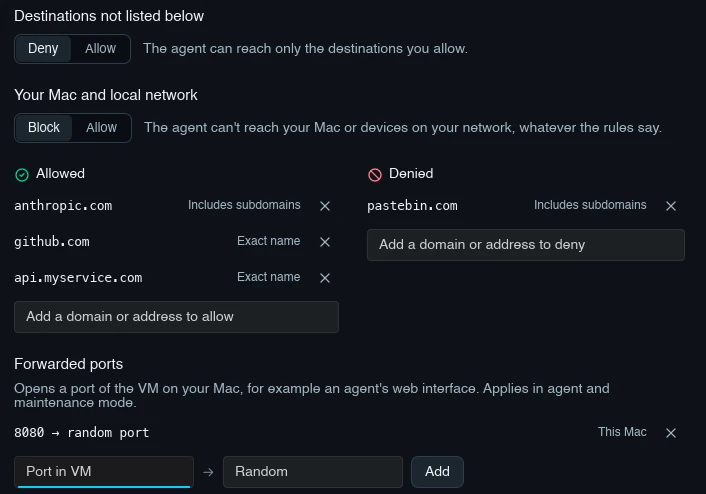
Network settings in the New instance flow: destinations not listed are denied, your Mac and local network are blocked, anthropic.com and github.com are allowed, pastebin.com is denied, and port 8080 is forwarded.

Limit

Allow or deny domains and addresses per instance. Destinations you don't list are denied, and your Mac and local network are blocked by default.

Rules are enforced on the Mac, outside the VM, so the agent can't turn them off. Forward only the ports it needs and set its environment variables.

customer-ux-study: activity
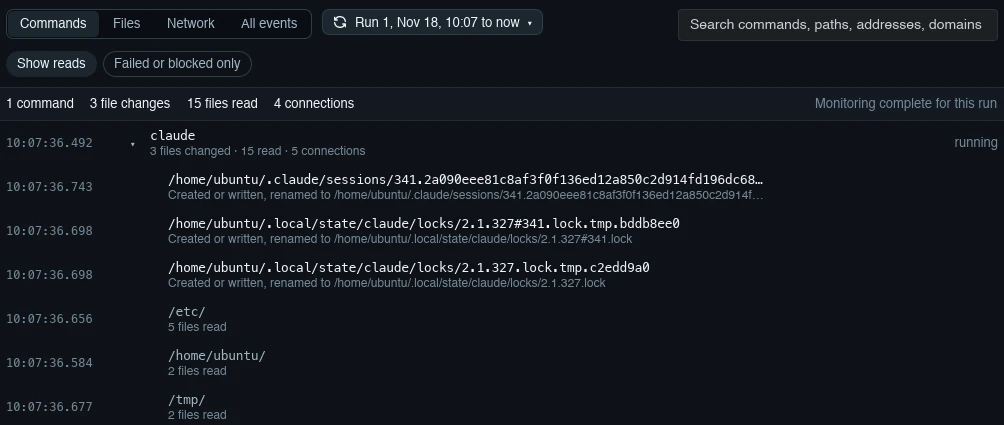
The Commands view of the Activity tab: the claude process with the files it changed and read, grouped by folder, and monitoring complete for this run.

Observe

An eBPF observer in the guest records program runs with their arguments, privilege changes, file changes and connections. The Mac adds DNS lookups and every allowed or blocked flow.

Each run says whether monitoring was complete. When events are lost, it tells you.

From empty Mac to a boxed agent

Creating an instance takes a few choices. Agentarium handles the virtual machine.

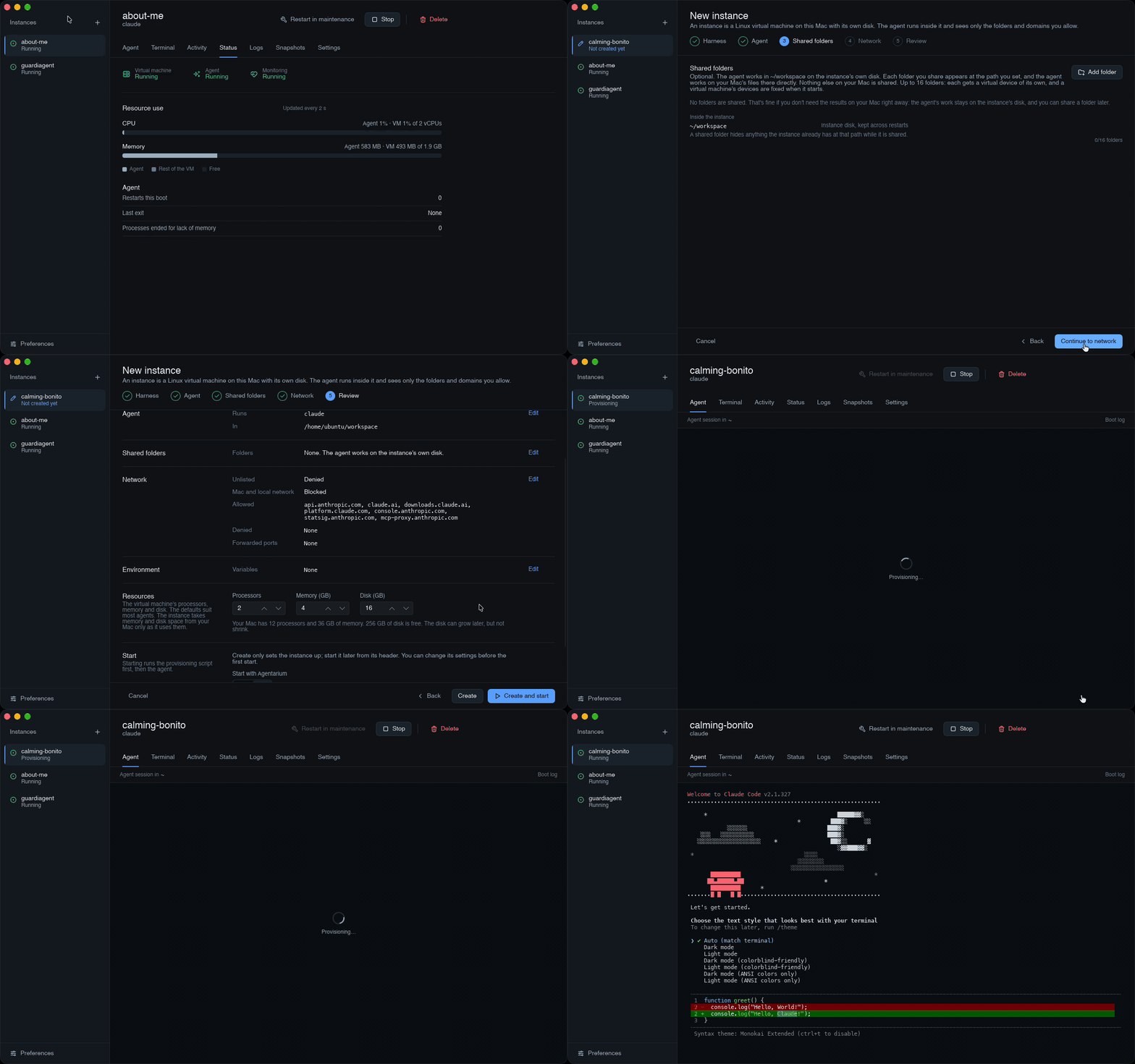
Screen recording: the New instance flow with harness, agent, shared folders, network and review steps, then Create and start, provisioning, and the agent session opening.
RecordingCreating, provisioning and starting an instance.
  1. Step 1
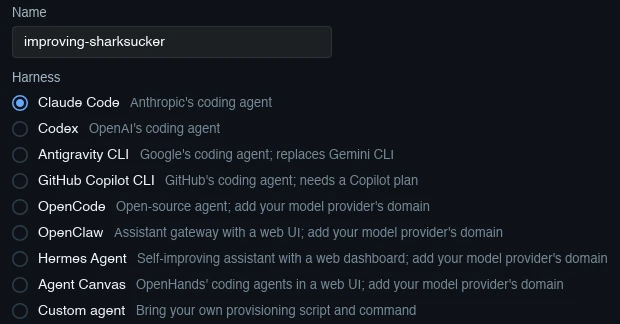
    The Harness step: a name for the instance and the list of presets, Claude Code selected, down to Custom agent.

    Pick an agent

    Name the instance and choose a preset. A preset installs a known agent and allows the domains it needs. Or bring your own provisioning script and command as a custom agent.

  2. Step 2
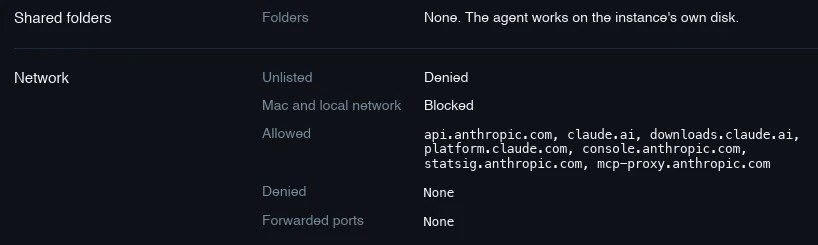
    The review of shared folders and network: no shared folders, unlisted destinations denied, Mac and local network blocked, and the Claude Code domains allowed.

    Share folders, set rules

    Choose the folders the agent may see and the domains it may reach. Presets start with their own domains allowed and everything else denied.

  3. Step 3
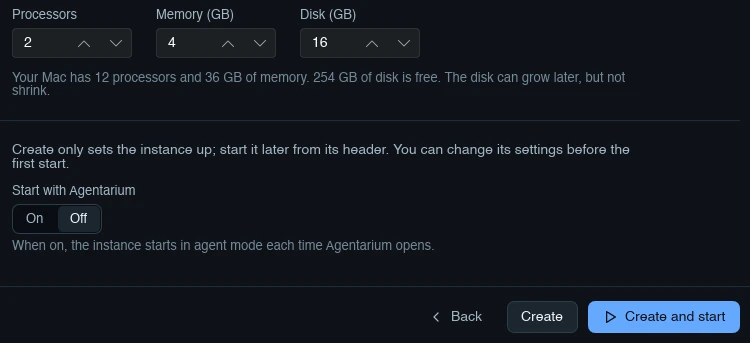
    Resources and start options on the review step: 2 processors, 4 GB memory, 16 GB disk, Start with Agentarium off, and the Create and Create and start buttons.

    Create and start

    Check processors, memory and disk, then Create and start. Starting runs the provisioning script once as root, then the agent. Agentarium keeps a "Freshly provisioned" snapshot.

  4. Step 4
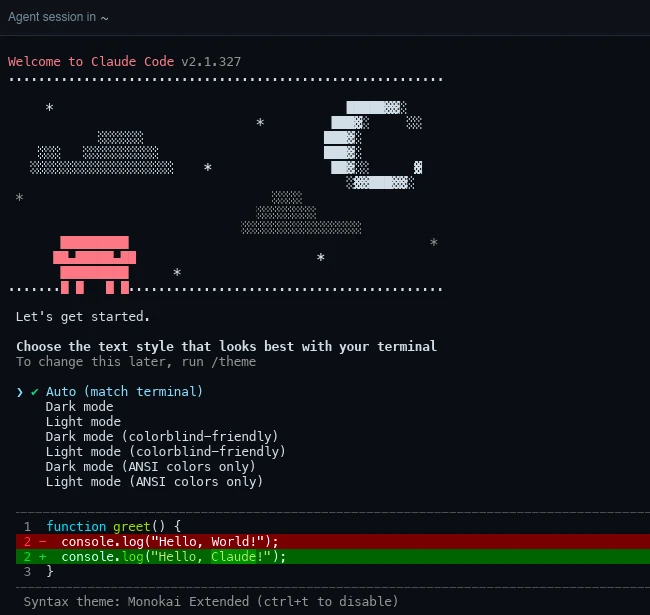
    The Agent tab of a running instance: the Claude Code welcome screen inside the instance.

    Work, then check

    The agent's session opens in the Agent tab. Afterwards, Activity shows what it ran, changed and contacted.

Also in the box

The tools you need around an agent, without leaving the app.

Boot modes

Agent, maintenance, provision

Agent mode runs the agent. Maintenance gives you a root shell for installing software or changing the instance, for one boot only. Provision runs the setup script.

Snapshots

Go back to a known state

Create, restore and delete snapshots of a stopped instance. They're instant clones of its disk and configuration.

Terminal

A shell in every instance

The agent's session and extra login shells, embedded in the app, with 100,000 lines of scrollback.

Status

Three separate readings

Virtual machine, agent and monitoring each report their own state, next to live processor and memory use.

Resources

Sized per instance

Set processors, memory and disk for each instance. Disks can grow later, never shrink.

Updates

Signed and notarized

Updates download in the background and install on "Restart to update". Choose Stable or Dev builds.

What it records, and what it doesn't

Activity states what was recorded, never what the agent intended. Here is exactly what that covers.

Recorded in agent mode
  • Program runs, with arguments, working directory and exit code
  • Privilege changes
  • File opens, writes, creates, renames and deletes
  • TCP and UDP connections
  • From the Mac: DNS lookups and each allowed or blocked flow, with the rule that decided it
Not recorded
  • Environment variables, program output and file contents
  • What you do in the Terminal tab's shells
  • Maintenance and provision boots
  • Traffic through forwarded ports

Agentarium has no account and no hosted backend. The app itself contacts GitHub only for updates and the Linux guest image. Agents reach whatever your rules allow, such as their AI provider.

Events from inside the VM are evidence of what happened, not a tamper-proof audit trail.

Get Agentarium

Install the signed package, open the app and create your first instance. On first launch it downloads a Linux kernel and root filesystem, a few hundred megabytes.

Portable .zipAll releases and dev buildsSource code

System requirements
Mac
Apple silicon
macOS
26 or later
Disk
An APFS volume. Each instance starts with a 16 GB disk, which you can change.
Licence
AGPL-3.0 or later, free and open source

From research to product

Agentarium builds on two papers from the Programming Group at the University of St.Gallen.

AgentBound
ACM FSE 2026Peer-reviewed

AgentBound: Securing Execution Boundaries of AI Agents

Least-privilege permission manifests and a sandbox for MCP servers.

In AgentariumFolder access you grant per instance, and network rules enforced on the host.

BibTeX
@inproceedings{buehler2026AgentBound,
  title = {{{AgentBound}}: {{Securing}} Execution Boundaries of {{AI}} Agents},
  booktitle = {Proceedings of the 34th {{ACM}} Joint European Software Engineering
               Conference and Symposium on the Foundations of Software Engineering ({{FSE}})},
  author = {Bühler, Christoph and Biagiola, Matteo and Di Grazia, Luca and Salvaneschi, Guido},
  date = {2026-07},
  doi = {10.1145/3808103}
}
AgentSpy
arXiv 2610.06001Preprint

AgentSpy: Making AI Agent Behavior Observable

Runs the agent in a microVM and records system calls and network activity from outside the agent.

In AgentariumThe VM-per-agent model and the eBPF activity record.

BibTeX
@misc{buehler2026AgentSpy,
  title = {{AgentSpy}: Making {AI} Agent Behavior Observable},
  author = {Bühler, Christoph and Biagiola, Matteo and Di Grazia, Luca and Salvaneschi, Guido},
  year = {2026},
  eprint = {2610.06001},
  archivePrefix = {arXiv}
}

Christoph Bühler, Matteo Biagiola, Luca Di Grazia, Guido Salvaneschi